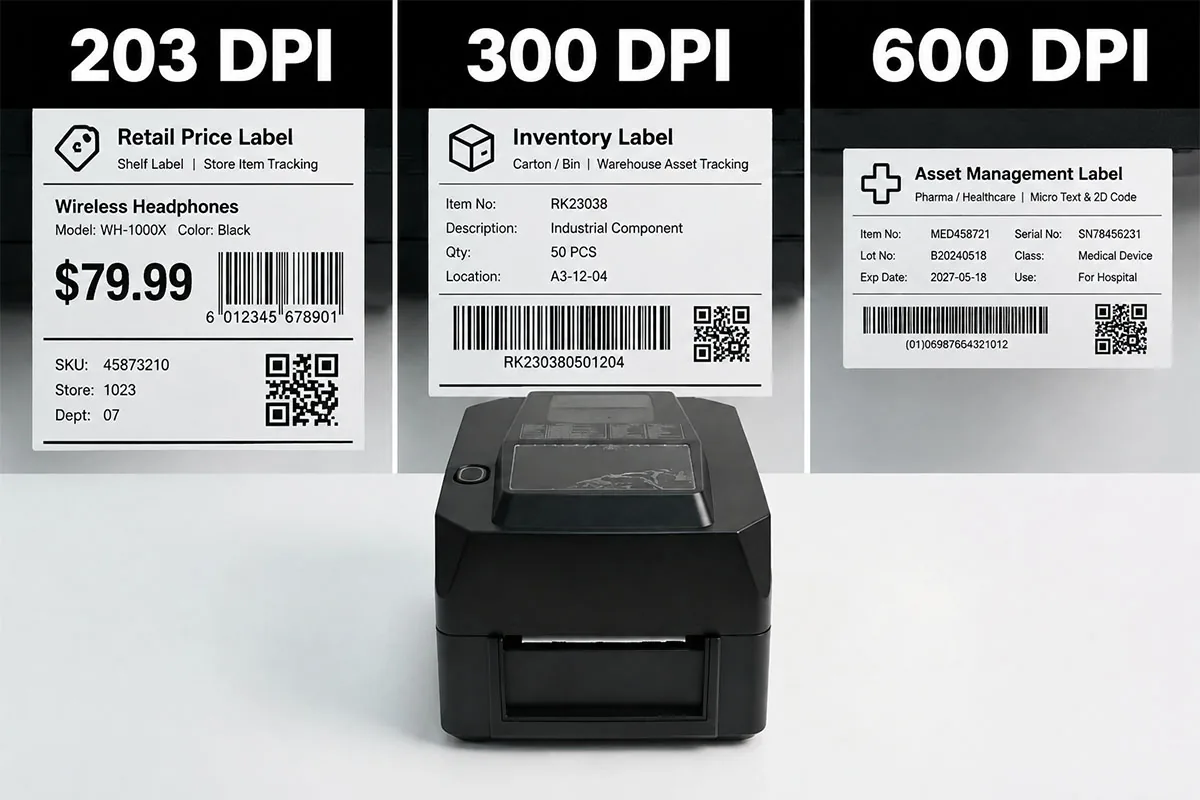
Managing inventory by hand, or with legacy barcode scanners, quietly drains margin — missed counts, stockouts, and hours lost aiming a reader at every symbol. A purpose-built RFID smart label printer removes that friction: it prints and encodes UHF RFID tags in a single pass, so your team can read hundreds of items per second without line of sight. In this guide we compare three CRSMT UHF RFID printers — the SU200, SU300 and SU600 — and explain which one fits your inventory workflow.
| Feature | SU200 | SU300 | SU600 |
|---|---|---|---|
| Resolution | 203 dpi | 300 dpi | 600 dpi |
| Print Speed | 200 mm/s | 150 mm/s | 100 mm/s |
| Max Print Width | 104 mm | 108 mm | 105 mm |
| Max Print Length | 4000 mm | 3000 mm | 1000 mm |
| RFID Band | UHF 860–960 MHz | UHF 860–960 MHz | UHF 860–960 MHz |
| Chip Support | NXP / Impinj / Alien | NXP / Impinj / Alien | NXP / Impinj / Alien |
| Command Sets | TSPL-II + ZPL-II | TSPL-II + ZPL-II | TSPL-II + ZPL-II |
| Interfaces | USB + Ethernet + Serial + USB Host | USB + Ethernet + Serial + USB Host | USB + Ethernet + Serial + USB Host |
| Optional | BT / WiFi, 4.3" touchscreen | BT / WiFi, 4.3" touchscreen | BT / WiFi, 4.3" touchscreen |
| Certifications | CCC / CE / RoHS | CCC / CE / RoHS | CCC / CE / RoHS |
| Best For | Retail & chain-store item-level | Warehouse carton & bin | Pharma / medical / asset |
CRSMT (Zhuhai Core Smart Equipment Co., Ltd) has manufactured POS terminals, thermal printers, label printers and barcode scanners since 2017, with 80+ patents and shipments to more than 30 countries. The three printers below are real, shipping UHF RFID models — not hypothetical benchmarks. The specs in this article come directly from each product page, so what you read here is what you can order. As an OEM/ODM manufacturer we also tune configurations, firmware and label consumables to your deployment.
Before the rankings, here are the five variables that actually decide fit:
New to tags? Start with Common RFID Tag Types Explained and How to Choose the Right RFID Chip.
The SU200 is the workhorse of the lineup: 203 dpi at a class-leading 200 mm/s, the widest media (104 mm) and the longest print length (4000 mm). For retail price tags, shelf labels and chain-store item-level tracking, it delivers the lowest cost per label at the highest throughput.
Fastest engine in the family, longest media run, and TSPL-II + ZPL-II emulation so it drops into existing label software and ERP/WMS without driver rewrites. The USB Host port connects a barcode scanner or keyboard; RS232 links an electronic scale for weight-based printing.
Retail price tags, shelf-edge labels, apparel hang-tags and single-item-level tracking across chain stores and pharmacies.
Retailers, chain stores and brand owners printing thousands of item-level labels per shift where speed and media economy beat fine print.
If you only buy one RFID printer for inventory, buy the SU200 — it covers the broadest set of everyday labeling jobs at the best total cost.
Ready to print your own UHF RFID labels? See the CRSMT SU200 RFID Label Printer specifications and request a quote.
Explore SU200 RFID Label Printer →The SU300 steps up to 300 dpi at 150 mm/s, with the widest media of the three (108 mm) and a 3000 mm print length. It is built for smart-warehouse operations where cartons, totes and bins need smaller, denser barcodes that still scan at distance.
Expandable memory easily handles complex variable-data RFID label templates for bulk inventory tagging, and the 108 mm width accommodates four-across carton layouts. Same TSPL-II + ZPL-II stack and compact 205×270×168 mm desktop footprint as the SU200.
Bulk inventory tags, carton and bin labels, and warehouse asset tracking in distribution centers and logistics hubs.
Warehouse, logistics and distribution teams printing denser carton/bin labels and managing large asset populations.
Choose the SU300 when label density and carton coverage matter more than raw speed — it is the balanced warehouse workhorse.
Need finer carton and bin labels? See the CRSMT SU300 UHF RFID Printer specifications and request a quote.
Explore SU300 UHF RFID Printer →The SU600 delivers ultra-fine 600 dpi at 100 mm/s with a 105 mm width and 1000 mm length. It exists for the jobs where print quality is non-negotiable: micro-text, tiny 2D codes and regulatory-grade labels.
600 dpi resolves compact DataMatrix and QR codes plus legible micro-text on small pharmaceutical and medical labels — critical for anti-counterfeit and traceability programs. Shares the same desktop footprint and command sets as its siblings.
Micro-text and compact 2D codes on medical and pharmaceutical labels, and high-value asset management tags.
Pharmaceutical, healthcare, electronics and asset-management teams that must print small, high-density, regulation-ready RFID labels.
Pick the SU600 when label precision is the requirement — it is the specialist, not the generalist.
Printing precision pharma or asset labels? See the CRSMT SU600 RFID Tag Printer specifications and request a quote.
Explore SU600 RFID Tag Printer →| If your priority is… | Choose | Why |
|---|---|---|
| Lowest cost per label at max volume | SU200 | 200 mm/s, 4000 mm length, 104 mm width |
| Denser carton / bin barcodes | SU300 | 300 dpi, 108 mm width |
| Micro-text & small 2D codes | SU600 | 600 dpi precision |
| Standalone, PC-free operation | Any + 4.3" touchscreen | Optional TFT LCD on all three |
| Wireless / mobile deployment | Any + BT/WiFi | Optional module on all three |
CRSMT sells these printers as configurable OEM/ODM units, so final pricing depends on resolution, optional touchscreen, wireless modules and order volume. The most cost-effective starting point for inventory programs is typically the SU200. Contact our team for a quote tailored to your label format and roll quantity.

There is no single “best” RFID printer — only the best fit. For the majority of inventory programs, the SU200 is the right starting point: fastest, widest, longest, and lowest cost per label. Move to the SU300 when carton and bin density demand finer print, and reserve the SU600 for precision pharma, medical and asset labels. All three share the same UHF encoding, command sets and desktop footprint, so you can standardize operations and scale by resolution.
Want a configuration matched to your labels and volume? Talk to the CRSMT team for a quote and sample roll.