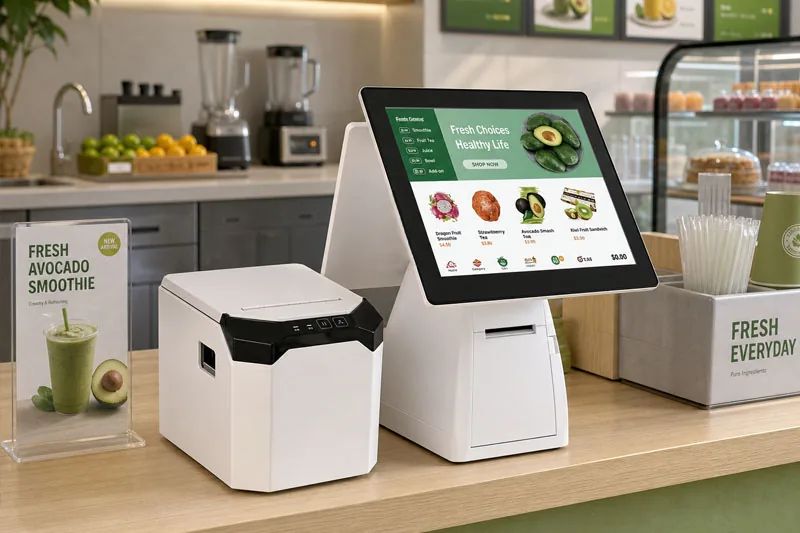
A POS printer (point-of-sale printer) is a specialized printer built to produce transaction documents — receipts, kitchen chits, order tickets, and labels — right at the point where a sale happens. Unlike a general-purpose office printer, a POS printer is engineered for speed, reliability, and continuous daily use in busy retail, hospitality, and service environments. It prints in seconds, runs quietly, and keeps working through thousands of transactions a day.
In short: a POS printer is the "proof of purchase" machine behind every checkout counter, self-service kiosk, and mobile vendor.
Most modern POS printers use direct thermal technology. A heated printhead touches heat-sensitive paper and darkens it exactly where heat is applied — no ink, no ribbon, no toner. That is why thermal receipts print instantly and silently, but also why they can fade if exposed to heat or sunlight over time.
The POS printer does not think for itself. It receives ESC/POS commands from the POS software (the cash-register app or POS system) over a communication interface, then renders the text, barcodes, and layout onto paper. Common interfaces include:
The most common type of POS printer. They come in two widths: 80mm for full-size receipts (retail, restaurants, supermarkets) and 58mm for compact receipts (cafes, food trucks, kiosks). A built-in auto-cutter snaps the receipt cleanly, and speeds reach up to 500mm/s on commercial models.
Best for: retail front-desk receipts, restaurant kitchen order tickets, mall checkout counters, and any counter that needs a clean, on-hand printed record it can keep for reference.
The U80C 80mm Thermal Receipt Printer delivers up to 500mm/s print speed with kitchen-grade durability, while the X3C 80mm Thermal Receipt Printer with Cutter adds linerless (no-backing-paper) printing for eco-friendly, print-and-peel labels. Both support USB, LAN, WiFi, and Bluetooth. For 58mm receipts, the 5860III 58mm Thermal Printer runs at 100mm/s over a Serial (RS-232) port with 203 DPI resolution and ESC/POS support on Windows — a compact, no-cutter pick for mall and retail counters.
View U80C Specifications →Impact printers use a ribbon and pins to strike through multipart (carbon) paper, producing duplicate copies in a single pass. They are slower and noisier than thermal printers, but they are the right choice for hot, greasy kitchens where thermal paper would smear or fade and where a duplicate "order copy" is legally or operationally required.
The 7645C 76mm Impact Printer uses a 9-pin dot-matrix head to print one original plus two carbon copies in a single pass at 4.5 lines per second. It comes with USB + Serial as standard (Ethernet, WiFi, and Bluetooth optional), supports 33/35-column layouts, and includes an auto-cutter — a dependable triple-copy workhorse for kitchens and POS counters.
View 7645C Specifications →Label POS printers produce product tags, price labels, shipping labels, and barcode stickers. A 2-inch (58mm) format is perfect for cup labels and jewelry tags, while a 3-inch (80mm) format handles shipping and inventory labels.
The LabelPrint 200 Desktop Sticker Printer is purpose-built for bubble tea shops, coffee shops, and beverage businesses. Its 2-inch format is ideal for cup labeling, and the compact footprint fits any counter.
View LabelPrint 200 Specifications →Mobile POS printers are battery-powered and built to move — for delivery drivers, field sales, warehouse inventory counts, and pop-up events. They connect over Bluetooth and WiFi and are drop-resistant (often IP54 rated).
The H803 3-inch Portable Thermal Printer packs 120mm/s speed, Bluetooth 5.0, NFC, and a 2600mAh battery into a rugged IP54 design — perfect for delivery, field inventory, and mobile POS.
View H803 Specifications →An all-in-one POS terminal combines a touchscreen, built-in receipt printer, and often a scanner into a single device. It is the most space-efficient checkout solution for small retail and food-service counters.
The M60 Android POS Terminal pairs a 15.6" FHD multi-touch screen with a built-in 80mm thermal printer (220mm/s, auto-cutter) and runs Android 13 on a Qualcomm octa-core platform with 4GB RAM and 64GB storage. Dual-band WiFi, Bluetooth 5.0, and 4G LTE are standard, and a dual-screen option adds a 15.6" customer-facing display — a complete checkout for coffee shops, boutiques, and food trucks.
View M60 Specifications →You might wonder: can't I just use the laser or inkjet printer in the back office? For receipts, almost never. Here is why a dedicated POS printer wins:
| Factor | POS Printer | Office Printer (Inkjet/Laser) |
|---|---|---|
| Print speed | Up to 500mm/s, instant | Slow per page, warm-up time |
| Paper type | Roll receipt / label paper | Cut-sheet A4 |
| Reliability | Built for daily, all-day use | Designed for low volume |
| Cost per print | Fraction of a cent | Much higher (ink/toner) |
| Footprint | Compact, counter-friendly | Large, desk-bound |
The right choice depends on your environment: a Thermal POS Printer for most counters, an Impact POS Printer for duplicate kitchen copies, a label POS printer for product and shipping labels, a mobile pos printer for on-the-go printing, or an all-in-one terminal for a single compact checkout. For a full, business-type breakdown, see our POS printer buyer's guide.
A POS printer is a purpose-built, high-speed printer that turns a sale into a physical receipt, ticket, or label at the point of sale. Whether you need thermal, impact, label, mobile, or all-in-one, choosing the right type saves time and keeps your checkout running smoothly. Get in touch with our team for a free recommendation tailored to your business, volume, and budget.